 3.00M tokens

Shared Project · Demo
alexdev
ShipKit
Developer Tools · TypeScript
A toolkit for shipping side projects.
View ProjectActivity Shared Beside Your Projects
Show your work and the AI activity behind it.
DevClash is a private AI usage tracker for macOS, Windows and Linux. Track usage locally, earn build credits, and choose when to share your projects with other developers.
Your AI Tools, One View
 Claude
 Codex
 Cursor
 OpenCode
Open Source. Private By Default.
Track your AI token usage locally. No account needed.
Claude, Codex, Cursor, OpenCode
Provider Breakdown
Claude1.50M50%Codex900K30%Cursor400K13%OpenCode200K7%Show the AI activity behind the projects you share. New usage earns credits that help your work get discovered.
ClaudeCodexCursorOpenCodeDeveloper Tools · TypeScript
A toolkit for shipping side projects.
View ProjectShow your work and the AI activity behind it.
Sign in, choose to sync usage, then convert eligible new tokens into build credits. 100M eligible tokens earn one credit. Accumulate at least 100M unconverted eligible tokens to convert, with no daily earning cap. See eligibility details.
Reach a new community, put your project in view, and get practical help to improve it.
Explore communities and start conversations.
Join another city's online builder community for 1–7 days.





Lisbon, Portugal
Building in public and meeting founders in Lisbon.
Start a conversation with a builder open to introductions.
Product Builder · San Francisco, CA
Highlight your project across the community.
Highlight your project on the map and discovery feed.
A lightweight toolkit for shipping your next project.
San Francisco, CA
Promote a request for testers or feedback.
I’m redesigning the first-run experience for Pathway and would love feedback from developers who use CLI tools.
Run structured tests and get real input.
Fund structured tests. Reward accepted feedback.
Test the onboarding flow
Help me test the new onboarding flow. I’m looking for feedback on clarity, missing steps, and overall experience.
Reserved up front. Paid when feedback is accepted.
1. Sign up and complete the onboarding flow
2. Tell us where you felt confused or stuck
“The flow is much clearer now! I got stuck on the ‘Connect a repository’ step — a short tooltip there would help. Overall really smooth.”
Example · Demo
Community credits. No cash value.
Spend a few days in another city’s builder community. Meet people, share your project and head home automatically.
A profile that brings your projects and activity together, so other builders remember who made what.
Open To Feedback@alexmorgan
Building useful tools for independent developers.
Show the human behind your projects and make a lasting impression.
Give context to what you build and invite the right people to get involved.
Be easier to find by other builders who share your interests.
Opt in to the leaderboard, see where you stand and share your rank with the community.
Top builders by client-reported AI token usage.
ClaudeCodexCursorOpenCodeAnimated sample rankings. Select a builder to preview their rank card. The loop pauses while keyboard focus is inside this demo. All totals are illustrative.
See how your activity ranks among builders who’ve opted in, with filters for time period, providers, and region.
Showcase your rank with a clean, shareable profile card. Your public profile and ranking participation are separate choices.
Prompts, replies and code are never uploaded to DevClash. If you turn on sync, only usage metadata is shared.
You write, build and experiment. DevClash tracks your usage locally on your device — no account required.
Prompts & RepliesStay on your device
Source CodeStays on your device
Provider CredentialsUse directly with providers
Illustrative animation: cloud sync starts off. If you enable it, usage metadata can sync to your account. This demo does not change settings or upload data.
If you turn it on, DevClash can upload usage summaries to your cloud account. Only usage data is shared.
Which provider and model you used
Input, output, total
When you made the request
Based on provider pricing
Sharing your profile and projects is a separate choice. You decide what to make public.
Turning on sync does not publish your profile.
What to know about accounts, privacy, credits and the leaderboard before you start.
DevClash tracks supported usage from Claude, Codex, Cursor and OpenCode. Available detail depends on the provider: Claude, Codex and OpenCode can include recorded project usage, while Cursor usage is account-wide. Missing measurements are shown as unavailable.
Create an account and choose to sync usage, then convert automatically eligible new tokens into credits. Every 100M eligible tokens earns one credit (1B tokens = 10 credits). Accumulate at least 100M unconverted eligible tokens before converting. Fractional credits above the minimum are included, with no daily earning cap. Usage from before your account was created does not qualify; daily snapshots qualify from the next UTC day. Sync by the end of the following UTC day to qualify. Later uploads stay in your history. Local tracking alone does not issue credits.
No account is needed to track usage locally. Sign in when you want to sync usage or use community features.
If you enable cloud sync, DevClash uploads usage metadata such as provider, model, token counts, timestamps and estimated costs. Prompts, replies, source code and provider credentials are not uploaded to DevClash.
No. Cloud sync, public-profile sharing and leaderboard participation are separate choices.
No. Credits are community points with no cash value. Use them for Virtual Travel, Launch Beacon, Builder Ping, Feedback Quest and Tester Exchange rewards.
No. It temporarily places your profile in another city’s online builder community. Your real location does not change.
Client-reported AI token usage from builders who opt in. It does not measure skill or project quality.
Still have questions? hello@devclash.ai
Pick your platform and start tracking right away. No account needed until you want to sync or share.
Download DevClash for your desktop and start tracking locally.
Three steps from download to your first usage numbers.
Choose the app for your desktop.
Start tracking locally, without an account.
Usage Tracked Locally
Sign in when you want to sync usage or join the community.
Discover projects, follow builders and keep the conversation going wherever you are.
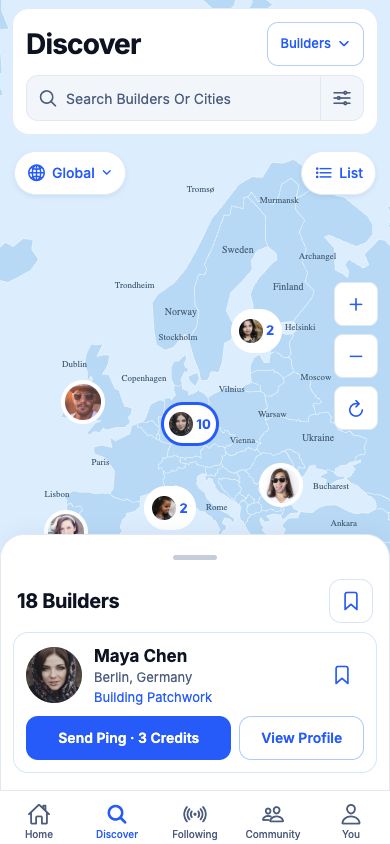
Explore what others are building around the world.
Get the latest from builders and projects you care about.
See your desktop usage insights on mobile after you choose to sync.
 Available Now
 Available Now
Usage insights require desktop tracking and optional sync.
Download DevClash, keep building and let your projects and activity speak for you.
Your work, your profile, your choice.
No account needed for local tracking. Sync and sharing are optional.